



SRT Ingest on Dacast: What It Is, How It Works, and How to Use It

SRT (Secure Reliable Transport) is a UDP-based ingest protocol built for real-time video contribution over imperfect networks. As part of Dacast’s new ingest pipeline, SRT support was introduced alongside the existing RTMP ingest to improve stream stability, reduce interruptions, and create a foundation for future ingest enhancements such as deeper transport monitoring and eventual support for additional media components (like multiple audio tracks and captions), once downstream systems support them.
What SRT Ingest Is
SRT ingest is a way to publish live video to Dacast using SRT instead of RTMP. While RTMP is widely supported and historically common, it is typically delivered over TCP, which can behave poorly under real-world packet loss:
- Missing packets trigger retransmissions.
- Head-of-line blocking can delay subsequent data until the missing packet is recovered.
- The result is often stalls/freezes, latency spikes, and occasional disconnects when network conditions degrade.
SRT was added as an alternative designed to behave more predictably in these scenarios.
Why Dacast Added SRT
The goal wasn’t to replace RTMP overnight, it was to introduce a more resilient option for streamers who experience unstable networks and need better real-time behavior.
Project objectives:
- Add production-ready SRT ingest in the new ingest pipeline
- Improve stream stability under packet loss and jitter
- Reduce interruptions and improve user experience during degraded network events
- Establish a foundation for future ingest improvements (transport monitoring, and richer media support), subject to downstream pipeline capability
How SRT Works (Compared to RTMP)
SRT is UDP-based and includes mechanisms tailored to real-time transport: packet recovery within a latency budget, jitter buffering, and explicit latency control.
RTMP vs SRT in production
| Problem with RTMP (TCP) | What it looks like for streamers | What SRT changes |
| Retransmissions + head-of-line blocking | Freezes, latency spikes, occasional disconnects | UDP transport with ARQ retransmissions bounded by configured latency, reducing stalls and keeping latency more predictable |
| No protocol-level jitter management | Timing instability, buffering behavior | Receiver-side jitter buffer smooths arrival timing |
| Limited transport observability | Hard to isolate encoder vs network vs ingest issues | Transport stats (RTT, loss, retransmissions, buffer stats) enable future monitoring/RCA |
| TCP congestion and buffering under poor conditions | Throughput drops, “bufferbloat”, degraded real-time behavior | Real-time oriented congestion handling; recovery bounded by latency configuration |
| No explicit ingest latency semantics | Latency can grow unpredictably | Configurable latency model (including TSBPD) for consistent operation when tuned correctly |
How SRT Ingest Works in Dacast
In Dacast’s new ingest pipeline, SRT streams are processed through the same production chain used for live delivery:
SRT ingest → SRS → FFmpeg → ABR outputs
This preserves a consistent output and playback experience while improving ingest robustness for difficult network conditions.
How to Use SRT Ingest on Dacast
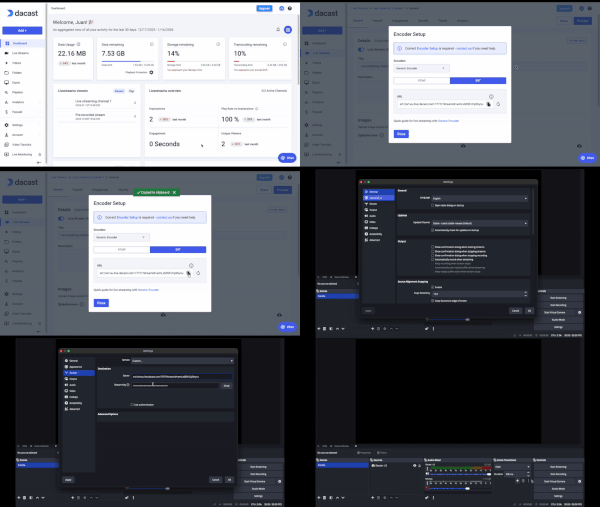
1) Choose SRT when your network is unstable (or unpredictable)
SRT is most valuable when streaming from:
- Mobile networks / bonded cellular
- Congested public Wi-Fi
- Venues with variable upstream quality
- Long-haul contribution paths with jitter/loss
If your network is consistently clean and low-latency, RTMP may still be “good enough,” but SRT gives you a stronger safety margin.
2) Validate encoder compatibility (desktop and mobile)
SRT compatibility is generally strong, but real-world behavior can differ by:
- Encoder app
- OS (iOS vs Android vs desktop)
- server version and protocol implementation details
During Dacast validation, this mattered enough to influence production architecture (see “Lessons learned”).
Contact
If you’re rolling out SRT ingest and see instability, capture:
- Encoder app + version (desktop/mobile)
- Network type and observed jitter/loss
- Timing of stalls/glitches vs observed conditions
Support: dacast.com/contact/
