



What’s the Most Cost-Effective Way to Start Live Streaming for Business?

Live video is now the go-to format for getting attention. It delivers immediacy and connection in a way static posts rarely do, and it seems like most teams have taken notice, with about 89% of businesses now using video as part of their marketing mix.
At the same time, the market itself is growing fast as forecasts show the global live-streaming market is expected to expand by roughly USD 20.64 billion between 2025 and 2029, with a CAGR of around 16.6%. More businesses are streaming, and the channel is scaling quickly.
Many marketers see noticeably higher interaction with live video compared to pre-recorded or standard posts. For instance, Facebook Live and Instagram Live often generate up to ten times more comments and engagement than their non-live counterparts. While these spikes in engagement aren’t guaranteed, they demonstrate the unique potential of live video to capture attention and drive interaction.
That growth explains why companies of all sizes want to find business live broadcast solutions, but it also highlights the main tension they face: quality versus cost. Organizations want streams that look polished and run reliably, but they don’t want to blow the budget on cameras, encoders, or enterprise platforms. The good news is you can close that gap with thoughtful planning, smart gear choices, and the right platform.
This guide shows you how to start streaming on a budget while catering to your business goals, pick affordable equipment and software, choose the best budget streaming platform, and apply cost-saving tactics so your live video looks and performs like a professional production, without breaking the bank. Ready? Let’s walk through it.
TL;DR – Cost-effective business live streaming in 2026
- Plan first: define the goal (leads, training, events) and the primary viewing destination (website, LinkedIn, YouTube).
- Start minimal: phone/webcam + good audio + simple lighting + stable internet beats expensive cameras early on.
- Stream smart: 1080p at ~4–6 Mbps is “professional” for most business use cases and keeps bandwidth/storage costs down.
- Use free tools where it counts: OBS can handle encoding, scenes, overlays, and basic production without added cost.
- Choose platforms by control needs: social platforms = reach; pro platforms = white-label, analytics, access control, monetization.
- Scale only when a real constraint appears: upgrade gear or plans when analytics, reliability, or workflow demands it.
Table of Contents
- Planning Your Live Stream Strategically
- Equipment & Setup Options – What You Really Need (and What You Don’t)
- Choosing the Right Live Streaming Platform
- Cost-Saving Strategies for Businesses
- Using Dacast for Affordable Professional Streaming
- FAQs
- Conclusion – Professional Live Streaming Doesn’t Have to Be Expensive
Planning Your Live Stream Strategically
Effective planning is at the center of cost-effective live streaming. Without a clear strategy, businesses often overspend on unnecessary gear, software, or production services, only to find the results don’t align with their goals. Thoughtful planning optimizes budget and enhances viewer experience and engagement, ensuring your live broadcasts make an impact.
Define Your Goal
Start by identifying the primary purpose of your live stream. Consider questions such as:
- Are you aiming to educate employees or clients through training sessions or internal communications?
- Is your goal to promote a product, service, or event, generating leads and brand awareness?
- Do you want to engage your audience directly, answering questions in real time through Q&A or interactive webinars?
Your goal determines your setup, from camera selection and audio quality to streaming platform and production workflow. For instance, a product launch might benefit from multiple camera angles, live graphics, and pre-recorded segments to ensure a polished broadcast, whereas an internal training session may require only a single webcam, screen capture software, and reliable audio.
Identify Your Audience and Preferred Platforms
Understanding your audience is a must if you want to deliver content that resonates. Consider their preferences, behaviors, and devices to decide where and how to broadcast.
- Professional audiences often gravitate toward LinkedIn Live or company intranets.
- Consumer audiences are more likely to engage on YouTube, Facebook Live, or Instagram Live.
- Direct streaming on your website is ideal for both professional and B2B audiences who value a controlled experience, ad-free viewing, and deeper engagement analytics.
Note that direct streaming on your website requires both a white-label streaming platform for reliable hosting and an HTML5 live video player to deliver a seamless, branded viewing experience.
Additional considerations include geographical location, peak online activity times, desired interaction levels (live chat, polls, Q&A), and mobile versus desktop consumption. These factors influence everything from stream bitrate to camera framing and interactive overlays.
Choose Your Content Format
Selecting the right content format helps prevent unnecessary production expenses and ensures a focused, engaging live broadcast. Common formats include:
- Q&A Sessions: Encourage direct engagement and real-time feedback.
- Product Demos: Showcase features, applications, or use cases effectively.
- Webinars: Position your brand as a thought leader and generate leads.
- Behind-the-scenes or Event Coverage: Humanize your brand and offer unique perspectives.
Each format comes with its own production requirements. A multi-camera product demo demands more sophisticated audio and video equipment, while a single-host webinar can often be executed using affordable professional live video tools like OBS Studio. Planning the format ahead of time ensures you purchase only the necessary equipment and start professional streaming without expensive gear, saving money and setup time.
Expert Insights for Budget-Friendly Success
- Plan First, Buy Later: Map out your workflow, camera angles, graphics, and interactions before investing in gear. This avoids overbuying expensive hardware or software.
- Keep It Scalable: Start with essential equipment and build gradually, especially if planning recurring live streams.
- Leverage Free or Low-cost Software: Open-source encoders like OBS Studio, free graphics tools, and pre-existing office hardware can still deliver professional results.
- Think Audience-first: Production quality is important, but clarity, audio, and content relevance matter more to viewers than a flashy live stream camera setup.
By clearly defining your objectives, understanding your audience, and selecting the most suitable format, you create a low-cost live streaming setup that maintains professionalism. This approach allows you to find the cheapest way to live stream for your company, avoiding wasteful spending and scaling efficiently as your business grows.
Equipment & Setup Options – What You Really Need (and What You Don’t)
It’s easy to get overwhelmed by gear options when starting out with live streaming, especially if your goal is affordable live streaming for business purposes. The key is to focus on essentials first and avoid unnecessary expenses that don’t add real value to your stream.
Cameras: Start Simple
Your camera is your most important visual tool, but you don’t need a high-end cinema rig for professional-looking streams. Consider:
- Budget (<$300): Smartphones with high-quality cameras, entry-level webcams. Great for webinars or small business live streams.
- Mid-range ($300–$800): Entry-level mirrorless or DSLR cameras that allow manual focus and better low-light performance. Ideal for product demos or corporate presentations.
- Pro ($1,000+): Full-frame mirrorless or camcorders with clean HDMI output, suitable for events or multi-camera setups.
A simple setup is often enough for most live streaming for small business marketing, and starting small reduces upfront costs while you learn your workflow.
Audio: Invest Modestly
Audio quality has a huge impact on viewer perception, often even more than video. Affordable lapel mics or USB condenser microphones can dramatically improve the experience without breaking the bank. For interviews or panel discussions, consider a small audio mixer for better control.
Lighting: Affordable Options Work
Good lighting prevents your stream from looking flat or noisy. Budget-friendly ring lights or softboxes under $100 provide soft, even illumination and are sufficient for most indoor setups. Natural light can also be leveraged during daytime streams.
Encoders and Software
You need a tool to convert your camera feed into a live stream. Options include:
- Free / DIY: OBS Studio / open-source encoder for small businesses or startups on a tight budget.
- Paid / Professional: vMix, Wirecast, or hardware encoders for more advanced production, multi-camera setups, or integrations.
Video bitrate optimization is essential, so for 1080p streams, aim for 3–6 Mbps upload. Higher resolutions like 4K significantly increase bandwidth requirements and storage costs, so weigh the trade-offs carefully.
Internet & Upload Speeds
Reliable internet is non-negotiable. For 1080p streaming, ~5 Mbps upload per stream is typically sufficient. Test your connection before going live, and avoid overspending on high-tier plans if you won’t be using full capacity.
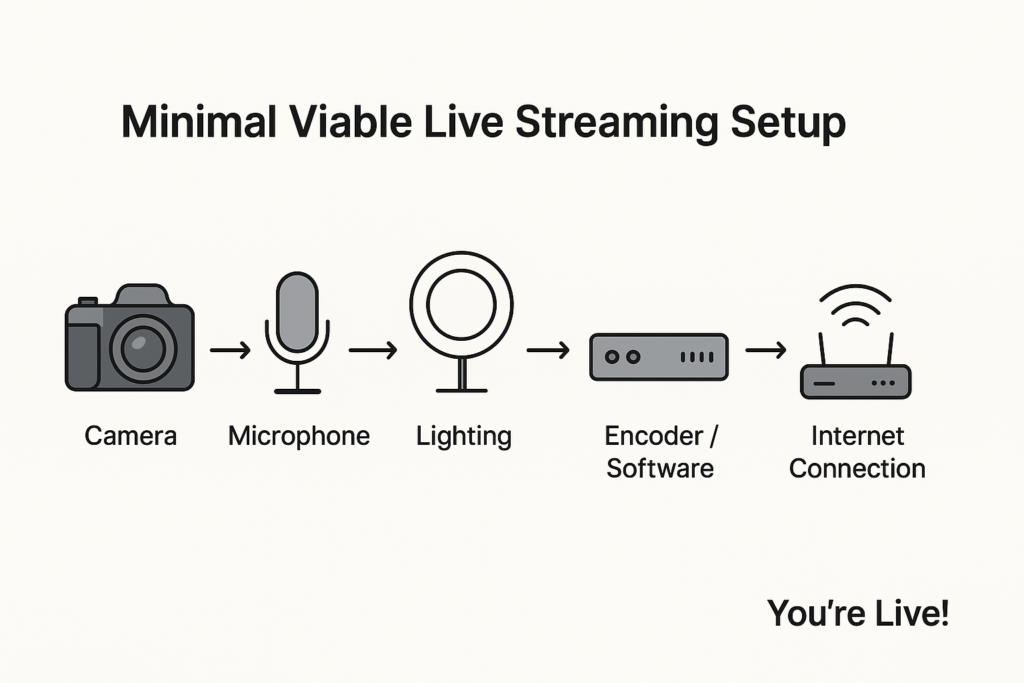
A minimal viable setup often includes a camera, mic, basic lighting, an encoder, and a stable internet connection, which is completely enough to produce professional streams without unnecessary extras.
Choosing the Right Live Streaming Platform
Selecting the right streaming platform is one of the most critical decisions for any budget video production. Your choice affects everything from video quality to audience experience, monetization opportunities, and long-term scalability. Let’s break down the options so you can make an informed decision.
Free Platforms
Free/social platforms are built for reach, not control. They are tempting SMB streaming solutions because there’s no upfront cost, and they provide access to large audiences quickly. Their main goal is to keep users on their platform, engaging with content that serves the algorithm, but not necessarily your business goals. That doesn’t make them bad – it just means they’re optimized for creators and influencers, not companies that need ownership over branding, privacy, or distribution.
Common free streaming platforms include:
- YouTube Live – best for public broadcasts, search discoverability, and long-term replay value.
- Facebook Live – strong for community or follower engagement within the FB ecosystem.
- Instagram Live – highly interactive but mobile-only and designed for casual broadcasts.
- LinkedIn Live – great for B2B events, thought leadership, or employer branding.
- TikTok Live – short-form audience, ideal for creators and consumer-facing brands.
All of them offer instant visibility inside ecosystems people already use, which is perfect for awareness campaigns or quick updates. But they also share the same foundational limitations, as you don’t own the space you’re streaming in.
Pros
- Zero Cost to Start: Great for testing topics, formats, or audience interest.
- Instant Algorithmic Reach: Followers get notifications, and streams appear in feeds.
- Engagement Tools Built In: Comments, reactions, shares, and live chat stickers are all part of the experience.
Cons
- Platform-first Branding: Their logo, their interface, their rules. Your stream sits inside their environment.
- Ads and Distractions: Viewers can see unrelated ads or suggested videos, taking attention away from your brand.
- Limited Business-grade Features: No white-labeling, weak analytics, no controlled access, limited monetization options.
- Algorithm Dependency: Your reach is not guaranteed, as it’s determined by the platform’s interests, not yours.
- Data Ownership Issues: You don’t own full viewer data, which makes funnel-building harder.
- Not Suitable for Internal or Paid Events: No way to restrict access securely.
Free platforms work well for casual broadcasts, public announcements, or community engagement, but they often fall short in representing your brand consistently. They function almost like “public squares” – great for visibility, but not the best affordable streaming platforms for businesses that want professionalism, reliability, or full control over the viewer experience.
Professional Platforms
Professional platforms, such as Dacast, Vimeo, Brightcove, Wowza, and others, operate on a completely different philosophy from social streaming. They’re built for ownership, control, and business reliability. Instead of serving an algorithm, they exist to give companies a branded, stable, and secure environment where the audience experience is entirely in your hands.
These platforms are typically used for:
- Product launches and webinars
- Paid virtual events
- Private trainings or internal communications
- Recurring B2B content
- White-label customer portals
- Streams that require embedding on a company website or app
They’re not just “fancier YouTube alternatives,” they’re infrastructure. Making this decision is similar to choosing a proper CRM instead of managing customer data in a spreadsheet.
Pros
- Full White-label Control: Your branding, your domain, your player – no external logos or suggested videos. The entire environment reflects your company, which is critical for sales funnels, enterprise clients, regulated industries, and agencies managing multiple brands.
- Serious Analytics: Instead of vanity metrics (“views”), you get business-grade data, including audience retention, geo/location breakdowns, device insights, watch-time patterns, and conversion tracking. It’s the kind of information marketing and sales teams can actually act on.
- Real Monetization Options: Monetization via pay-per-view or subscription, bundled access, coupon support, and sponsorship overlays are all things that consumer platforms aren’t built to handle. That’s why professional platforms are perfect for gated content or paid virtual events.
- API + Integration Ecosystem: Build custom portals, apps, or OTT experiences. Automate workflows. Sync with CRMs or LMS systems. Many agencies rely on this layer to deliver client-branded channels without building streaming infrastructure from scratch.
- Security That Suits Businesses: Password protection, single sign-on, domain and referrer restrictions, tokenized URLs, geo-blocking, DRM, and more, provide you with the kind of access control you need when streaming something you cannot leak or lose.
- Predictable Reliability: Professional platforms use reliable live streaming CDNs, uptime SLAs, and tech support designed for mission-critical events.
And here’s the key point: paid doesn’t automatically mean expensive, so they absolutely allow you to build a cost-effective live streaming setup in 2026.
For SMBs and growing teams, a well-chosen professional streaming software and platform can be far more cost-effective than relying on “free” tools that cost you brand presence, data, or reliability. You get uptime, privacy, white-labeling, and full control, all of which directly support business goals.
Professional platforms aren’t just nicer to use, but they give your live stream an actual strategy, instead of just an audience.
Free vs. Professional Streaming Platforms Comparison
| Feature | Free Platforms | Professional Platforms |
| Branding | Platform logo present | Full white-label branding |
| Ads | Yes, uncontrolled | No ads (unless you choose) |
| Analytics | Limited | Advanced engagement and reporting |
| Monetization | Very limited | SVOD, PPV, ad integration |
| Privacy & Access | Public by default | Password, token, domain, geo-lock |
| API & Integrations | Minimal | Extensive support for custom apps and workflows |
| Reliability | Dependent on the platform | SLA-backed uptime, multi-CDN options |
| Best For | Social reach, casual broadcasts | Marketing campaigns, corporate events, client-facing streams |
Cost-Saving Strategies for Businesses
Small and mid-sized businesses don’t need studio-level budgets to deliver professional livestreams. In fact, the smartest teams treat cost-saving as a strategic advantage: they prioritize what truly affects quality and eliminate everything that doesn’t. Here’s how to build a solid, scalable livestreaming workflow without overspending.
Reuse and Repurpose the Equipment You Already Have
Before buying anything, evaluate what’s already in your office. Modern smartphones, even mid-range models, shoot crisp 1080p video. A simple $15–$25 phone tripod plus good lighting instantly elevates the look. Many laptops now ship with decent webcams, and older DSLR or mirrorless cameras can double as streaming cameras with a simple HDMI-to-USB capture card.
Expert Insight: Most businesses overspend early because they assume “professional” means buying new gear. In practice, stability, lighting, and audio matter more than the most expensive camera. Start with what you have, refine your workflow, and upgrade only when a specific limitation becomes unavoidable. That’s absolutely enough for a live streaming setup for a small business.
Optimize Encoding Settings to Save Bandwidth and Storage
A huge chunk of streaming costs comes from bandwidth, recording storage, and processing time, not necessarily the gear or software.
Streaming in 1080p at 4–6 Mbps looks excellent for 99% of business content and cuts your delivery costs dramatically compared to 4K. Most audiences can’t tell the difference unless you’re streaming cinematic visuals or product detail shots, but your budget will definitely feel the difference between the 1080p vs 4K streaming costs.
Expert Insight: If your audience is global or mobile-heavy, high-bitrate 4K might actually hurt engagement due to buffering. Smart encoding is not just cheaper, but also better for your viewers.
DIY Production With Free or Low-Cost Tools
You don’t need a production agency to elevate your stream. You can build a polished look with just a few DIY live streaming tips and tools:
- OBS Studio (free): Excellent encoder, scene switching, transitions
- Canva: Create branded lower-thirds, overlays, intro slides, thumbnails
- MixItUp or LioranBoard: Free alternatives to a Stream Deck for automated controls
- Photopea or CapCut Desktop: Free editing tools for post-stream highlights
Expert Insight: Most businesses underestimate the value of simple branding assets. A few clean overlays and consistent colors do more for professionalism than expensive hardware.
Schedule Smarter: Batch Content to Save Time
Instead of setting up gear for every individual event, batch your content creation:
- Record multiple product demos in one session
- Host a long-form livestream, then cut it into smaller clips
- Film FAQs and evergreen content during the same setup
This approach reduces setup time, staff time, and the need for repeated tech tests.
Expert Insight: The most cost-efficient teams treat livestreaming like a production day, not an isolated task. One well-planned session can fuel your content pipeline for weeks.
Monetize Your Content to Offset Costs
Even if your primary goal is marketing, monetization can help recoup costs or even turn streaming into a revenue channel:
- Subscriptions for ongoing training or courses
- Pay-per-view for premium webinars or events
- Sponsorships for branded product placements or mid-roll mentions
- Affiliate promotions tied to events
Expert Insight: You don’t need millions of viewers to monetize. A hyper-targeted webinar with 50–200 high-intent attendees can outperform a large, unsegmented following.
Use Analytics to Avoid Waste
Data helps you stop spending on the wrong things, especially when you’re working with enterprise streaming solutions. Make sure to track:
- Drop-off points
- Viewer devices (to optimize bitrate and format)
- Watch time
- Engagement patterns
- Repeat viewer behavior
If your analytics show that mobile viewers dominate, downscale your streams. If live attendance is low, pre-record segments and stream them at peak hours.
Expert Insight: Analytics prevent you from upgrading gear “just because.” Invest based on audience needs, not assumptions.
Using Dacast for Affordable Professional Streaming

For businesses trying to keep costs under control while still delivering polished, reliable live broadcasts, Dacast fits naturally into the “smart investment, not oversized expense” category. It’s an all-in-one ecosystem designed so companies don’t have to juggle multiple tools, guess at bandwidth, or worry about unexpected platform limitations as they grow.
Reliable, All-in-One Streaming and Hosting
One of the highest hidden costs in live streaming comes from fragmentation, which means using one service for hosting, another for the player, another for analytics, and something else entirely for monetization.
Dacast packages all of this into a unified live streaming platform with secure delivery, VOD hosting, and flexible embedding. For small teams, this cuts down dramatically on workflow complexity, subscriptions, and time spent troubleshooting inconsistent tools.
Scalable Plans That Grow With Your Business
Most companies begin with modest streaming needs but quickly expand once they see real engagement. Dacast’s graded tiers are structured so that you can start small and move up only when necessary. The bandwidth-based model makes it predictable for budgeting, and storage upgrades scale cleanly.
This avoids the common “hit a ceiling and have to migrate platforms” problem, which can become costly very quickly. The affordable streaming plans are designed to prevent exactly that.
White-Label Player, Ad-Free Viewing, and Built-In Monetization
Brand control is one of the key reasons businesses eventually outgrow free platforms. Dacast’s HTML5 video player is fully white-label, meaning no external logos, ads, or algorithmic interruptions. You can maintain your brand identity across websites, landing pages, and private portals.
For businesses looking to offset streaming costs, Dacast includes multiple monetization models: subscriptions, pay-per-view, and ad-supported options. Because it’s integrated directly into the platform, companies don’t need third-party tools or additional contracts. The video monetization tools are already wired into the workflow.
24/7 Support and Analytics – Cost Savings Through Efficiency and Reliability
When something goes wrong mid-stream, most free or semi-pro tools can’t offer timely help, and downtime is expensive. Dacast provides 24/7 live support, uptime guarantees, and detailed analytics for audience behavior, engagement, watch time, and quality-of-experience.
Having this level of insight allows teams to refine bitrates, choose better publishing times, and optimize bandwidth usage. Since Dacast is built on a CDN for live streaming designed for global reliability, companies can serve viewers anywhere without needing to overbuy infrastructure.
FAQs
What’s the cheapest way to live stream for my business?
Use a simple setup (phone/webcam + encoder) and pair it with an affordable live streaming platform. It keeps costs predictable while giving you a reliable HTML5 video player and better control than free-only options.
Can I live-stream with just my phone?
Yes, but it’s best for quick, low-stakes streams. For branded events, monetization, or consistent quality, you’ll want to send your phone feed through a proper live streaming platform.
What’s the minimum internet speed needed for professional streaming?
For 1080p, aim for 8–12 Mbps upload (dedicated). For 4K, 20–30 Mbps. A stable connection keeps your stream smooth across a global CDN for live streaming.
How do I monetize my live streams to cover costs?
Use pay-per-view, subscriptions, or sponsorships through a platform built for video monetization, where you control pricing and keep revenue.
Why should businesses avoid only using free platforms like YouTube or Facebook Live?
Free platforms are great for reach but limit control, insert ads, and restrict monetization. For a professional look, pair them with a dedicated live streaming platform for reliability, branding, and ownership of your content.
Conclusion – Professional Live Streaming Doesn’t Have to Be Expensive
Going live doesn’t require a studio budget. It just requires intention. When you plan your workflow, choose equipment that actually matches your goals, and lean on a platform that removes the technical heavy lifting, you can deliver a polished experience without overspending.
This is essentially how to live stream professionally for cheap: combine the right tools, stay focused on quality where it matters (audio, stability, delivery), and avoid the traps that quietly inflate production costs.
A thoughtful setup often beats a flashy one. Reusing gear, optimizing your encoding settings, and streaming through a dependable player can instantly elevate your broadcasts. And once you add analytics and monetization into the picture, live streaming becomes not only affordable but a long-term asset for your business.
If you want a platform that supports this kind of sustainable, budget-friendly approach, Dacast helps businesses launch affordable, reliable live streams that scale, whether for marketing, events, or corporate communications.
On that note, why not start today with the Dacast 14-day free trial? Sign up today to begin streaming live in a matter of minutes. No credit card is required.
Do you have questions or feedback about live streaming platforms or video broadcasting in general? Send a message to our 24/7 technical support team, and we will get back to you. For regular tips and exclusive offers, you can join our LinkedIn group.
